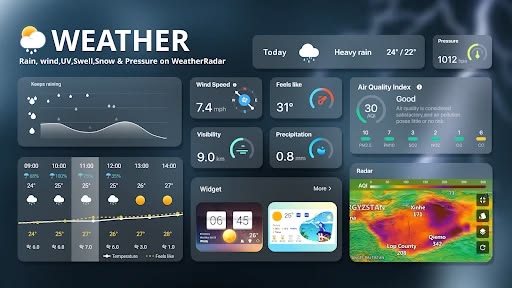
A weather forecasting system is an application that collects, processes, and presents weather-related information to users. It provides details about current atmospheric conditions and expected weather changes over a selected period.
The proposed system is developed using Java, JSP, and MySQL to create a dynamic web application.
Users can access the application through a web browser, enter a location, and retrieve weather information. The backend processes the request and communicates with a suitable weather data source to obtain the required information.
Main Objectives
Develop a web-based weather forecasting application using Java.
Display current weather conditions for selected locations.
Provide temperature, humidity, and wind information.
Integrate external weather services for updated weather data.
Store user details and relevant application records using MySQL.
Create a simple and interactive user interface using JSP.
Make weather information accessible through a web browser.
The system provides a convenient platform for accessing weather information and understanding the integration of Java-based web applications with external data services.
Key Features & Benefits
Weather Data Collection and Forecasting Technology
Weather forecasting applications depend on accurate weather information collected from weather stations, satellites, sensors, and meteorological data services.
In a web-based application, an external weather API can be integrated to retrieve current weather conditions and forecast information.
Important Weather Parameters
1. Temperature Monitoring
Temperature represents the atmospheric heat level of a particular location. The application can display the current temperature in Celsius or Fahrenheit.
2. Humidity Monitoring
Humidity indicates the amount of water vapor present in the atmosphere. It helps users understand moisture conditions in their surroundings.
3. Wind Speed
Wind speed provides information about how fast the air is moving. It is useful for understanding changing weather conditions.
4. Atmospheric Pressure
Atmospheric pressure represents the force exerted by the atmosphere. Changes in pressure can be useful indicators when interpreting weather patterns.
5. Rainfall Information
Rainfall information helps users understand precipitation conditions and prepare for possible rainy weather.
6. Weather Conditions
The system can display weather descriptions such as sunny, cloudy, rainy, stormy, and partially cloudy based on the information returned by the weather service.
Forecasting and Data Processing
The system can use weather API forecast data to display expected conditions for upcoming hours or days.
For advanced implementations, historical weather records can also be stored and analyzed using statistical methods or machine learning algorithms.
This makes it possible to extend the basic weather information application into a predictive weather analysis platform.
Implementation Guide
Key Features of the Proposed System
The proposed Java-based weather forecasting application includes several features for providing accessible and organized weather information.
1. City-Based Weather Search
Users can enter a city name to retrieve weather information for their selected location.
2. Current Weather Information
The application displays current temperature, humidity, wind speed, and weather conditions.
3. Weather Forecast Display
The system can retrieve forecast information from an integrated weather API and display expected conditions for upcoming periods.
4. Dynamic JSP Interface
JavaServer Pages are used to display weather information dynamically and create interactive web pages.
5. MySQL Database Management
MySQL stores user registration information, login details, search history, and other required application records.
6. User Registration and Login
Users can register and log in to access personalized application features.
7. Weather Search History
The application can maintain previous location searches so users can review their recently accessed weather information.
8. Responsive User Interface
The application can be designed to work across desktop computers, tablets, and mobile browsers.
9. External API Integration
The system can connect with weather data providers to retrieve updated weather information without manually collecting weather readings.
Technical Specifications
Technologies and Implementation Methodology
The project uses Java web development technologies and database management to build a functional weather forecasting application.
Software Requirements
Java: Main programming language for backend processing and application logic.
JSP: Used to generate dynamic web pages and display weather information.
Servlets: Handle HTTP requests, application processing, and communication between JSP pages and backend services.
JDBC: Provides connectivity between the Java application and MySQL database.
MySQL: Stores user information, search history, and relevant application records.
HTML: Defines the structure of the application pages.
CSS: Provides styling and responsive page layouts.
JavaScript: Supports interactive features and client-side validation.
Apache Tomcat: Application server used to deploy and execute the Java web application.
Weather API: Retrieves current weather and forecast information from an external weather service.
Hardware Requirements
Computer or laptop.
Minimum 4 GB RAM recommended.
Internet connection for weather API integration.
Standard web browser.
Server or local development environment.
System Implementation Process
Step 1: Project Environment Setup
Install the Java Development Kit, Apache Tomcat, MySQL Server, and a suitable Java IDE. Configure the development environment for JSP and Servlet execution.
Step 2: Database Creation
Create a MySQL database containing the required tables for user registration, login information, and weather search history.
Step 3: User Interface Development
Develop the application pages using HTML, CSS, JavaScript, and JSP. Create registration, login, dashboard, and weather search interfaces.
Step 4: Backend Development
Implement Java Servlets to handle user requests, process application logic, and communicate with the database.
Step 5: Weather API Integration
Connect the application to a weather service API. Send location-based requests and retrieve weather information in JSON format.
Step 6: Weather Data Processing
Parse the API response using Java libraries and extract important parameters such as temperature, humidity, wind speed, and weather descriptions.
Step 7: Database Connectivity
Use JDBC to connect the Java application with MySQL and store the necessary user and application records.
Step 8: Weather Dashboard Development
Display the retrieved information through a dynamic JSP dashboard using organized weather cards, location details, and forecast information.
Step 9: Testing and Deployment
Test registration, login, weather search, API communication, and database operations. Deploy the completed application using Apache Tomcat.
Conclusion & Next Steps
Conclusion
The Weather Forecasting System Using Java, JSP and MySQL demonstrates how Java web technologies and database management can be used to develop a practical weather information application.
The system provides users with a convenient way to search for locations and access weather information through an interactive web interface. By integrating external weather APIs, the application can retrieve current conditions and forecast information, while MySQL supports the storage of user details and search records.
This project provides valuable practical experience in Java programming, JSP, Servlets, JDBC, MySQL, and API integration. With additional enhancements using machine learning and IoT technologies, it can be extended into a more advanced weather prediction and monitoring solution.
Contact Aislyn Technologies
Aislyn Technologies, Bangalore
Phone: +91 97395 94609
Email: info@aislyntech.com
Website: https://aislyn.in
Contact us today to start building your Java, JSP, MySQL, and software development projects with our expert support!