ABSTRACT
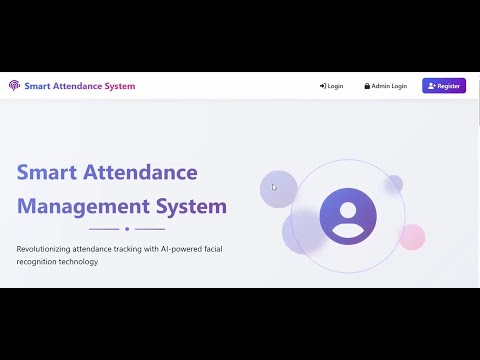
The Smart Attendance System is a secure and automated solution that replaces traditional manual attendance processes with real-time facial recognition and cloud-based record management. The system is developed using Python Flask, OpenCV, and the face_recognition library to capture, encode, and verify user faces with high accuracy. Users register by providing basic credentials and multiple face samples, which are converted into facial encodings and stored securely. During login and attendance marking, the system activates the webcam, captures a live frame, and performs facial matching against stored encodings to authenticate the user.
The application features two roles: User and Admin. Users can log in via face recognition, mark IN/OUT attendance, view their daily status, and check their full attendance history. The system automatically saves the captured images for IN and OUT events and can optionally send email notifications confirming attendance updates. Admins can log in through a secure portal to view total users, attendance statistics, and individual attendance records through a centralized dashboard.
The backend uses SQLite as a lightweight database to store user details, attendance logs, and timestamps. The system also integrates file-based storage for face images and encodings. OpenCV ensures smooth webcam capture, while Flask handles the routing, templates, and session-based authentication. By combining biometric authentication with real-time data processing, this system enhances accuracy, security, and efficiency, reducing fraudulent attendance and eliminating manual errors.
Overall, the Smart Face Recognition Attendance System provides a fast, user-friendly, and reliable attendance solution suitable for offices, institutions, and remote work environments.
INTRODUCTION
In today's fast-paced academic and professional environments, traditional attendance tracking methods have become increasingly inadequate. This Flask-based face recognition attendance system represents a significant leap forward in automating and securing the attendance recording process. The system harnesses cutting-edge computer vision and machine learning technologies to provide educational institutions with a reliable, efficient, and fraud-resistant solution for monitoring student presence. By transitioning from manual roll calls to biometric authentication, we address critical challenges in attendance management while introducing unprecedented levels of accuracy and convenience.
The foundation of this system lies in its sophisticated integration of multiple advanced technologies. At its core, the application utilizes the powerful face_recognition library, built upon dlib's state-of-the-art deep learning face recognition model, which boasts an impressive accuracy on the Labeled Faces in the Wild benchmark. This is complemented by OpenCV's
Haar cascades for initial face detection, creating a robust pipeline that can handle various real-world conditions. The web framework is powered by Flask, chosen for its lightweight nature and exceptional flexibility in handling both conventional web requests and complex computer vision operations simultaneously.
Security and privacy considerations have been paramount throughout the system's design. We implement a multi-layered security approach beginning with Flask-Login for session management and role-based access control. User credentials are protected through secure password hashing using Werkzeug's security utilities, ensuring that even in the unlikely event of a data breach, sensitive information remains protected. For biometric data, we've implemented a privacy-conscious approach where facial encodings are stored as mathematical representations rather than actual images, significantly reducing privacy concerns while maintaining system accuracy.
The system architecture follows a modular design pattern that separates concerns between face processing, data management, and user interface components. This separation allows for maintainability and future scalability. On the frontend, we employ a combination of HTML5, CSS3, and vanilla JavaScript to create responsive interfaces that can handle real-time video streaming from user webcams. The backend processes these streams efficiently, leveraging Python's robust ecosystem for scientific computing to perform resource-intensive face recognition tasks without compromising system responsiveness.
One of the system's key innovations is its adaptive learning capability. Unlike static recognition systems, our solution allows for continuous improvement of its recognition models as more student data becomes available. The training process converts facial images into 128-dimensional embeddings using a deep metric learning approach, which are then stored in efficient NumPy arrays for quick retrieval and comparison. This design choice enables the system to maintain high performance even as the user base grows, with recognition speed remaining consistently fast regardless of dataset size.
The attendance recording mechanism represents a significant improvement over conventional methods. When taking attendance, the system processes video frames in real-time, identifying present students and automatically logging them into organized, timestamped records. These records are stored in CSV format, categorized by both subject and date, making it exceptionally easy for administrators to track attendance patterns over time. The system also generates comprehensive reports that can be downloaded for record-keeping or further analysis, complete with visual indicators for attendance status.
User experience has been carefully considered at every stage of the system's development. The interface guides users intuitively through each process, from student registration to attendance taking and report generation. During registration, the system provides immediate feedback on face detection quality, ensuring only properly framed and well-lit images are added to the database. The attendance interface displays real-time recognition results, giving instructors immediate visual confirmation of which students have been successfully identified.
The system demonstrates particular strength in handling edge cases and challenging real-world conditions. It incorporates mechanisms to account for variations in lighting conditions, minor changes in facial appearance (like glasses or facial hair), and different head orientations. The recognition algorithm is tuned to minimize both false positives and false negatives, striking a careful balance between security and convenience. Additionally, the system includes comprehensive error handling to manage situations where face detection fails or recognition confidence is low.
Implementation considerations have focused on making the system accessible to institutions with varying levels of technical infrastructure. The application can run on modest hardware while still delivering responsive performance, and its file-based storage approach eliminates the need for complex database administration. For larger deployments, the architecture is designed to easily accommodate integration with existing student information systems or database backends, providing flexibility for different institutional needs.
Block Diagram
Requirement Specification
Pc
Software Requirement
The very Basics of Python
There are a few features of python which are different than other programming languages, and which should be mentioned early on so that subsequent examples don’t seem confusing. Further information on all of these features will be provided later, when the topics are covered in depth. Python statements do not need to end with a special character – the python interpreter knows that you are done with an individual statement by the presence of a newline, which will be generated when you press the “Return” key of your keyboard. If a statement spans more than one line, the safest course of action is to use a backslash (\) at the end of the line to let python know that you are going to continue the statement on the next line; you can continue using backslashes on additional continuation lines. (There are situations where the backslashes are not needed which will be discussed later.) Python provides you with a certain level of freedom when composing a program, but there are some rules which must always be obeyed. One of these rules, which some people find very surprising, is that python uses indentation (that is, the amount of white space before the statement itself) to indicate the presence of loops, instead of using delimiters like curly braces ({}) or keywords (like “begin” and “end”) as in many other languages. The amount of indentation you use is not important, but it must be consistent within a given depth of a loop, and statements which are not indented must begin in the first column. Most python programmers prefer to use an editor like emacs, which automatically provides consistent indentation; you will probably find it easier to maintain your programs if you use consistent indentation in every loop, at all depths, and an intelligent editor is very useful in achieving this.